

Deployments
A Deployment is one Service running in one Environment, such as prod, on one Deployment Target, a place such as a cluster. It is where the Service’s URL lives, because the URL is different in every Environment.
deployments: - service: web-app environment: prod target: platform:eks-prod url: https://bigbank.example/ib - service: web-app environment: staging target: platform:eks-staging url: https://staging.bigbank.example/ib - service: api environment: prod target: platform:eks-prod url: https://api.bigbank.example instances: { min: 2, max: 10 } endpoints: - name: health url: https://api.bigbank.example/actuator/health - service: api environment: staging target: platform:eks-staging url: https://api.staging.bigbank.example - service: database environment: prod target: platform:eks-prod - service: notifications environment: prod target: platform:eks-prodEnvironments and Deployment Targets
Section titled “Environments and Deployment Targets”An Environment is a named stage, such as prod or staging. It is defined once in workspace.yaml, so prod means the same thing in every Project.
A Deployment Target is a place a Service runs: a region, a cluster in it, a namespace or a platform. Targets nest to any depth, and each has a kind that says what it is. Big Bank’s Platform Team declares an AWS region with its clusters, and the Core Banking Team declares its own data center.
Targets aren’t Elements. Nothing depends on a cluster, so a Deployment Target never shows on a Structural View of Elements. Targets do have an Owner of their own, and other Projects use them by Qualified id, as platform:eks-prod above.
A Target isn’t tied to one Environment. The Deployments on it say which Environments it serves.
Deployments
Section titled “Deployments”A Deployment names its Service, Environment and Deployment Target, and those three identify it. The same three can appear only once: archidocs check reports a second one as duplicate-deployment.
Only a Service can be deployed. Systems and Components run as part of their Services. A Service can have several Deployments in one Environment, such as one per region.
The Deployment Targets and Deployments reference lists every field.
URLs live on Deployments
Section titled “URLs live on Deployments”A Deployment’s url is the Service’s main address in that Environment. Big Bank’s API is https://api.bigbank.example in production and https://api.staging.bigbank.example in staging. endpoints adds more named URLs, such as a health check.
That answers the QA Tester’s question, “what is this Service’s URL in staging?”. The viewer shows it in the Element panel. Over MCP, get_deployments returns it.
Agents can go the other way too. search_elements finds the Service deployed at a URL or host name.
Deployment Views
Section titled “Deployment Views”Each Environment has a Deployment View, a diagram that places every Deployment on its Target. Targets nest in it as they nest in the YAML. A Saved View can narrow one down, as Big Bank’s view of internet banking in production does:
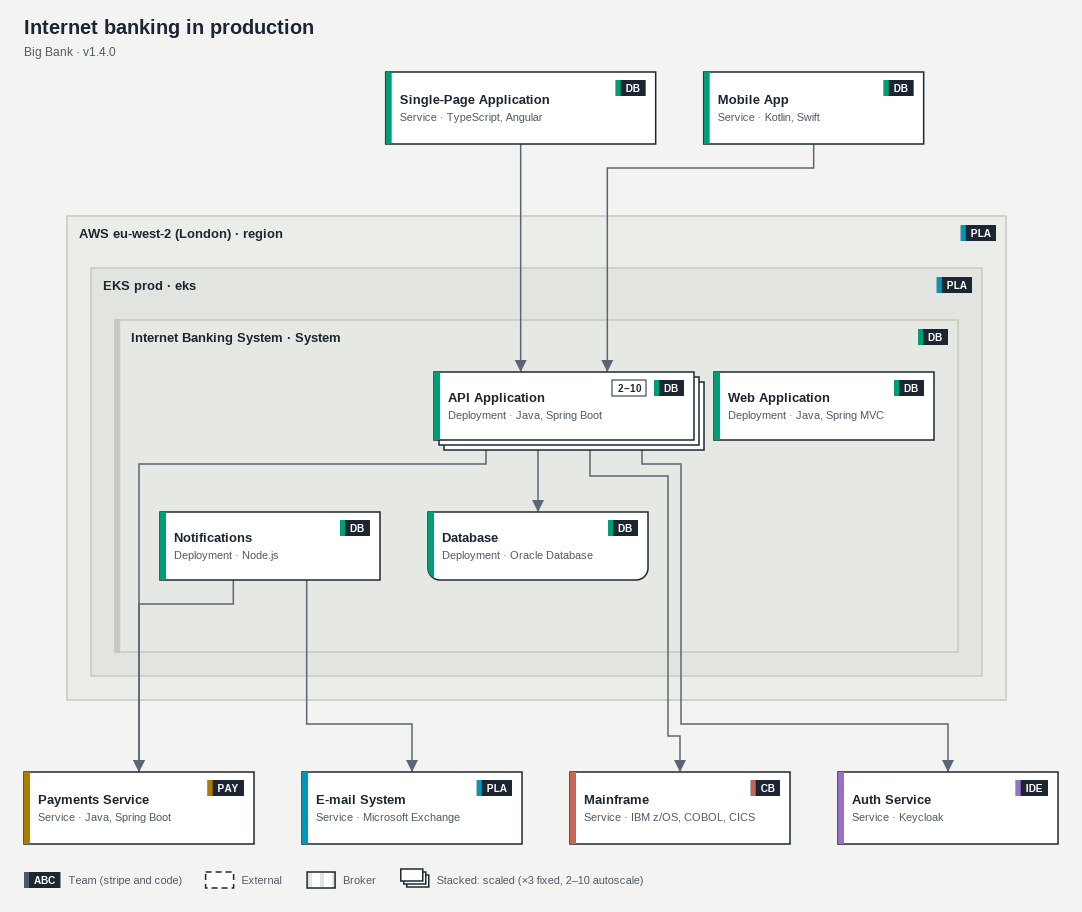
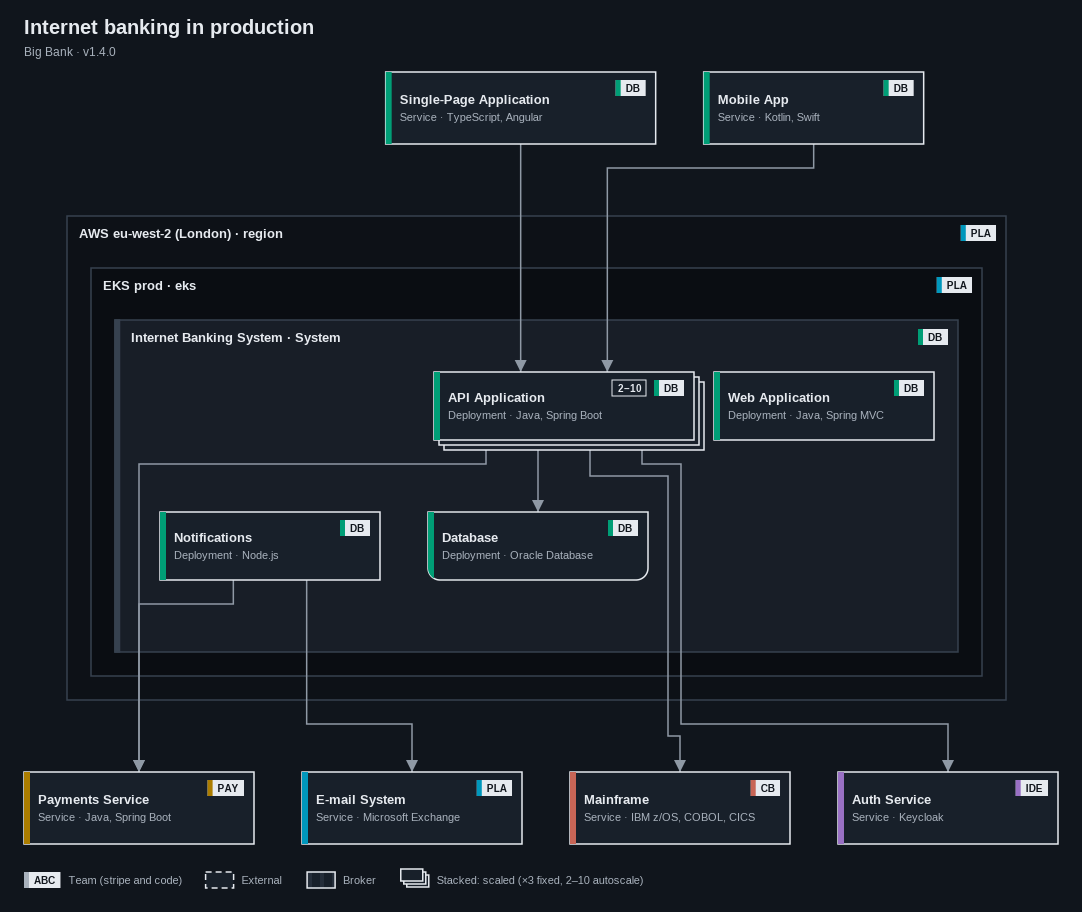
The edges between Deployments come from the Relationships between their Services. There are no Relationships that exist only in one Environment.
Why it works this way
Section titled “Why it works this way”- URLs live on Deployments, not on Services. A Service has a different URL in every Environment, and can have several in one, such as one per region. A single
urlon the Service would be right for one of them at most. - Targets aren’t Elements. A cluster runs software, but nothing calls it. Keeping Deployment Targets out of the Element tree keeps C1 to C3 Views about software, and Deployment Views about where it runs.
- A Deployment has no id to invent. Its Service, Environment and Target already say which Deployment it is. A second id would only be one more thing to keep in step.
- Environments are defined once. Every Project’s
prodis the sameprod, so a Deployment View ofprodcan show every Team’s Services together. - Relationships are declared once. Deployment Views take their edges from the Relationships, so there is one place to say what depends on what.
Related
Section titled “Related”Documents the beta branch at cd98671, ahead of the latest release, v1.4.0.