

Save a View
Write a Saved View, a View a Project keeps as a query over the Model, so a question that comes up often has a link that stays current.
Before you start
Section titled “Before you start”- The Elements the View shows are in the Model. See Add a Service.
- No Generated View answers the question already:
c1,c2,c2/<system>,c3/<service>ordeployment/<environment>. See Views.
1. Build it in the viewer
Section titled “1. Build it in the viewer”Run archidocs dev. Get the screen to answer the question: open what needs opening and turn on a Lens. Then use Save as View, which gives you the View as YAML.
2. Add it to the Project
Section titled “2. Add it to the Project”Paste it under views › structural in the Project’s views.yaml, keyed by an id unique among the Project’s Views:
structural: everything: title: Everything description: Every Element, with Shop and API open. level: c3 include: - element: shop with: descendants - customer - search - payment-gateway - payments-provider orders-db-outage: title: What an Orders DB outage affects description: The Services that depend on Orders DB, with the Impact Lens on. level: c2 include: - element: orders-db upstream: all exclude: - customer lens: impact: orders-db direction: upstreamtitle and level are required. The selectors that include and exclude take, and the Lenses, are in the Saved Views reference.
3. Check the Workspace
Section titled “3. Check the Workspace”archidocs check0 errors, 0 warningsCheck it worked
Section titled “Check it worked”In the viewer, open the View from the Views tree. It draws the same diagram you saved:
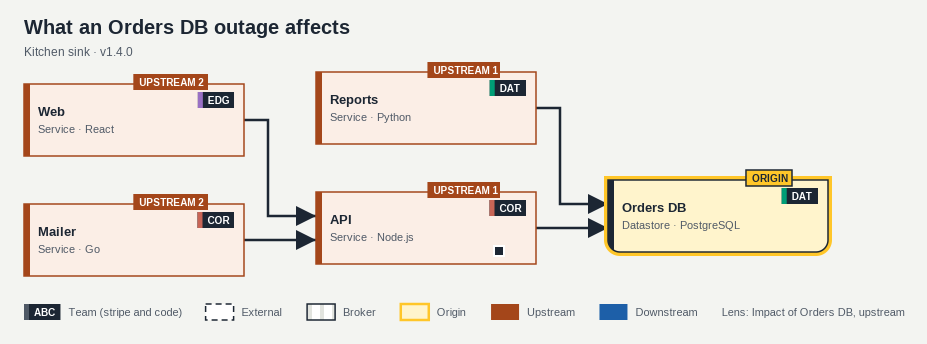
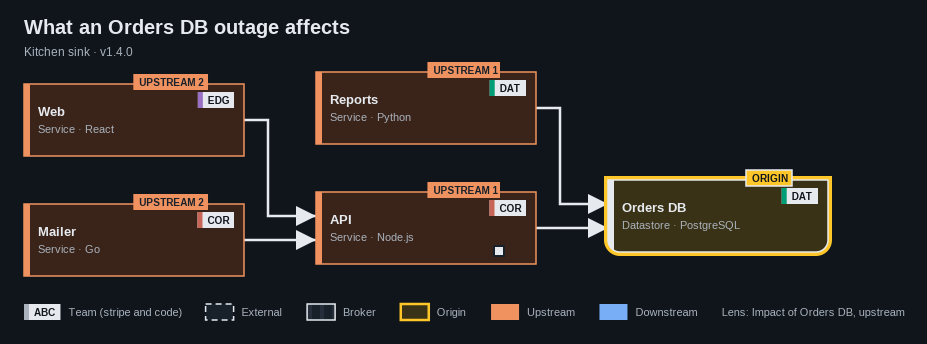
Once published, its link is #/view/<project>:<id> in the viewer.
If it didn’t
Section titled “If it didn’t”check reports empty-view when the View’s selectors match nothing. Check the ids it names.
check reports oversized-view when the View is too big to read. Narrow its include, or split it in two.
With an agent
Section titled “With an agent”upsert_view writes a View. get_view shows what it resolves to.
Related
Section titled “Related”- Views
- Saved Views reference
- Export diagrams, to draw the View as a picture
Documents the beta branch at cd98671, ahead of the latest release, v1.4.0.